Threat actors launched a rapid, automated campaign targeting cloud-hosted ConnectWise ScreenConnect instances. The campaign deploys rogue, attacker-controlled ScreenConnect clients alongside a custom, worm-like post-exploitation toolkit dubbed SCKit.
ConnectWise published an emergency advisory on November 11. Barracuda’s Security Operations Center (SOC) responded immediately, blocking all indicators of compromise identified to date across managed environments and conducting ongoing threat hunting. The actions Barracuda has taken are detailed below.
What is the threat?
The suspected attack began with the exploitation of a security weakness in third-party ScreenConnect extensions, particularly RMM+ versions 1.0.31 and 1.0.32, which could accept an empty access key and bypass authentication, roles, and MFA.
After gaining access, attackers used ScreenConnect’s Run Command feature with SYSTEM-level privileges to install an unauthorized client, deploy PowerShell and batch-based loaders, extract the SCKit toolkit, and establish persistence through the TrapWatch scheduled task.
Why is it noteworthy?
The toolkit can disrupt legitimate ScreenConnect services, maintain remote access, and potentially compromise technician workstations by stealing authentication cookies, replaying sessions, accessing management panels, and spreading payloads through shared tools.
This creates significant risks, including persistent unauthorized access, privilege abuse, credential and session theft, lateral movement, security control evasion, and exposure across multiple customer environments managed by MSP technicians.
What is the exposure or risk?
Because attackers install rogue ScreenConnect agents that communicate with external command-and-control relays, resetting console passwords or disabling extensions alone will not remove them from compromised endpoints.
Similarly, isolating an infected host without removing the TrapWatch scheduled task provides only temporary relief because the malicious persistence can re-establish itself when network connectivity returns.
The greatest risk occurs when a technician connects to an infected machine using a ScreenConnect version older than 26.6.5. A single compromised endpoint can potentially lead to the compromise of other customer environments managed by that technician, creating significant cross-tenant risk for MSPs.
How Barracuda protects its customers
As soon as the campaign was identified, Barracuda’s SOC took the following actions to detect, contain, and prevent the threat across the environments we protect:
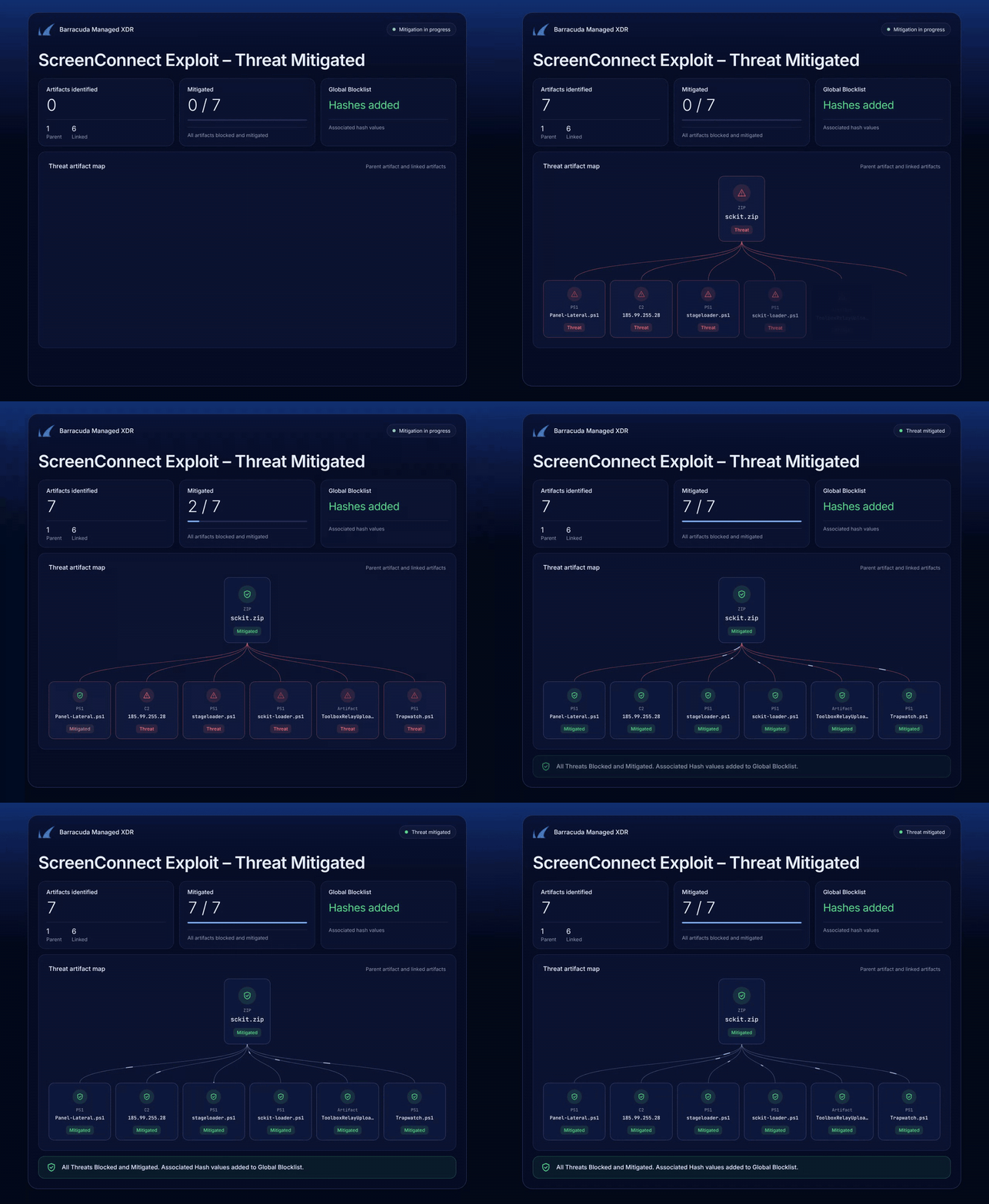
- Blocked known malicious files. We added known SCKit and rogue ScreenConnect file hashes to the global blocklist in our endpoint detection and response (EDR) platform. This prevents malicious files from running on protected endpoints.
- Deployed a custom detection rule. We created a behavioral detection rule in our EDR platform to identify activity associated with this campaign. This helps detect new variants even before their file hashes become publicly known.
- Loaded indicators into our threat intelligence platform. Our security team added published indicators of compromise (IoCs) to our threat intelligence platform and continues to add new indicators as they become available.
- Proactively hunted for the threat. We conducted threat hunting across firewall logs, Windows endpoints, and EDR telemetry to identify signs of the campaign in customer environments.
- Removed persistence where identified. Where malicious activity was found, we removed secondary and tertiary persistence mechanisms, including the TrapWatch scheduled task, to prevent the threat from re-establishing itself when endpoints reconnect.
Monitoring remains ongoing. If we detect related activity in your environment, our SOC will contact you directly.
What are the recommendations?
Barracuda recommends the following actions to mitigate the rogue ScreenConnect and SCKit worm campaign:
- Disable and uninstall affected plugins. Verify that Labtech Plus, RMM Plus, RMM+, RMM Plus Password Link, and RMM+ Password Link are fully disabled and uninstalled. On-premises instances must be disabled manually, as ConnectWise can only enforce this on cloud-hosted environments. Do not re-enable these plugins until further guidance is available from ConnectWise.
- Update technician clients. Ensure all technician clients are running version 26.6.5 or later across cloud-hosted and on-premises deployments. Updating the cloud console does not automatically update technician workstations. Disable Transfer Files or TransferFilesInSession wherever they are not required.
- Avoid interactive ScreenConnect sessions on potentially compromised endpoints. Initiating an interactive ScreenConnect GUI session can trigger reverse-pivot file transfer. Instead, use out-of-band EDR tooling. Isolate affected endpoints and preserve evidence before removing malicious files.
- Revoke sessions and secure affected accounts. From a verified clean workstation, revoke active ScreenConnect and associated identity-provider sessions. Reset affected credentials, enforce MFA, remove unnecessary administrative access, and verify that unauthorized clients and persistence mechanisms are removed before restoring connectivity.
- Monitor for reinfection. Review authentication records, extension installations, administrative changes, Run Command history, Shared Toolbox activity, and unexpected client installations for additional signs of compromise.
References
For more information, review the following resources:
If you have any questions about this Cybersecurity Threat Advisory, don’t hesitate to get in touch with Barracuda Managed XDR’s Security Operations Center.